Third-Party App Unlocks Full Potential of Pixel 11's Notification LED
Google's limited HiLight implementation leaves developers to fill the gap with custom control software
A Hardware Feature With No Software Depth
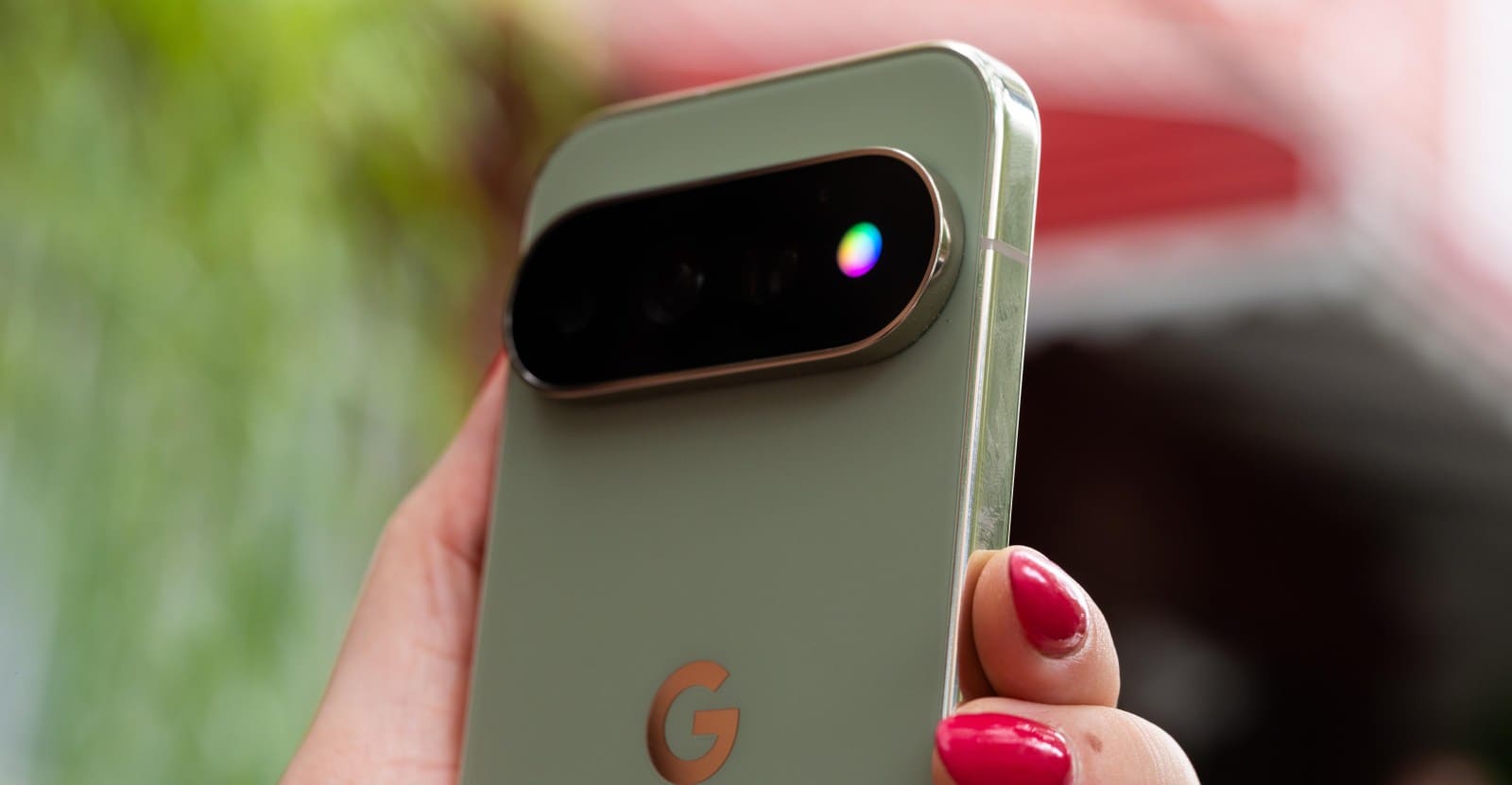
The Pixel 11 Pro arrived with a notification LED that recalls Android's golden era of blinking alerts. Google calls it HiLight. The hardware sits ready on every device, but the software configuration shipped in a state so constrained it borders on vestigial.
At DailyTechWire, we've tracked notification LED implementations across a dozen flagship launches in the past two years. None shipped with fewer native options than what Google bundled into the Pixel 11 Pro. The system offers exactly two use cases: a glow when the device lies face-down during Gemini interactions, and a second glow for incoming calls from starred contacts. Five colors. Two triggers. That's the entire span of what Google imagined users might want from programmable RGB hardware embedded in a $999 device.
The constraint feels deliberate, though Google has not explained the reasoning. Notification LEDs dominated Android hardware from 2010 through roughly 2018, when always-on displays and ambient screens began replacing them. Their return on the Pixel 11 Pro suggested Google recognized their utility for at-a-glance awareness. The implementation suggests otherwise.
Developer Response Arrives in Days
Within a week of the Pixel 11 Pro reaching consumer hands, a developer identified on X as Dhananjay_Tech released HiLight Studio. The app exposes what the hardware can do when software stops limiting it.
HiLight Studio grants per-app notification control. Users can assign specific colors to individual messaging apps, email clients, calendar reminders, or any service that posts to the Android notification tray. The LED can pulse, fade, or hold steady. Color choices expand beyond the five Google permits. Brightness adjustments become possible. Pattern sequencing lets users stack multiple colors in a single alert cycle.
The technical work required to build HiLight Studio is not trivial. Android's notification access APIs provide hooks for reading alerts, but controlling hardware LEDs typically requires either root access or cooperation from the OEM. Google's decision to expose even minimal HiLight controls in its stock ROM created a narrow pathway. Dhananjay_Tech's app threads that pathway and extends it into a full control plane.
The Pattern Repeats Across Pixel Generations
This is not the first time Google has shipped half-realized hardware on a Pixel device. The Pixel 4's Soli radar sensor launched with gesture controls so limited that most users disabled it. The Pixel 6's custom Tensor chip promised on-device AI workloads, yet many of those features arrived months late or required server round-trips. The Pixel 9's temperature sensor still lacks third-party API access.
Google's hardware teams consistently outpace its software counterparts. The gap between capability and implementation widens with each generation. HiLight fits the pattern: competent engineering wrapped in conservative product decisions that assume users want simplicity over control.
That assumption no longer holds in markets where Pixel competes. Samsung's Edge Lighting offers more granular controls on the Galaxy S25 series. OnePlus permits notification LED customization on the 13 Pro through its OxygenOS settings. Xiaomi's MIUI has included per-app LED triggers since 2021. Google's minimalism reads less as design restraint and more as feature neglect.
Why OEMs Hesitate on Notification Customization
Notification LED controls carry risks. Poorly configured alerts drain batteries. Users who assign too many colors forget which app maps to which hue. Support tickets multiply when customers cannot reset settings they do not understand. Google's caution likely stems from customer experience concerns, not technical limits.
But the existence of HiLight Studio demonstrates that users willing to install third-party software will bypass those guardrails regardless. The choice then becomes whether Google wants to own the experience or cede it to developers who may introduce instability, charge subscription fees, or fold the project when it stops generating income.
At DailyTechWire, we've watched this dynamic play out in other Android subsystems. Google locked down call recording, so third-party apps proliferated with inconsistent quality. It restricted background location access, pushing logistics apps into workarounds that consumed more power than the original APIs. Overly conservative defaults do not prevent determined users from seeking alternatives. They simply ensure those alternatives emerge outside Google's quality control.
What Users Are Building With HiLight Studio
Early adopters are documenting use cases on Reddit and XDA Forums. One user configured red for work email, blue for personal messages, and green for package delivery notifications. Another set up a slow purple pulse for calendar events thirty minutes out, shifting to rapid white as the event approaches.
These patterns require more than five colors and two triggers. They demand conditional logic, time-based rules, and priority hierarchies. HiLight Studio provides those tools. Google does not.
The app also exposes an API for Tasker integration, the automation app that has served as Android's power-user backbone since 2011. Users can now tie HiLight patterns to location, time of day, battery level, or any other condition Tasker monitors. The LED becomes a peripheral in a larger automation workflow, not just a passive alert indicator.
The Broader Trend in Android Customization
Google's approach to HiLight reflects a larger tension in Android's evolution. The platform built its reputation on openness and user control. That ethos attracted developers and power users who expected to modify, extend, and personalize every layer of the OS.
Over the past five years, Google has steadily narrowed that surface area. Scoped storage limited file system access. Notification listeners face stricter permissions. Background execution windows shortened. Each change arrives with a security or privacy justification, and many of those justifications hold merit. But the cumulative effect is an Android that feels more like iOS in its constraints, without iOS's polish in the features that remain.
HiLight Studio exists because Google left room for it to exist. The company did not lock down the LED hardware entirely. It simply chose not to build the software layer that users wanted. Whether that gap was intentional or an oversight, developers filled it.
What Comes Next for HiLight
Google has not commented on HiLight Studio or indicated whether future Pixel updates will expand native LED controls. The company's track record suggests it will not. Features that launch with minimal functionality rarely receive post-launch expansion unless they tie to a revenue stream or a flagship AI initiative. Notification LEDs do neither.
HiLight Studio will likely remain the de facto solution for Pixel 11 Pro owners who want more than two triggers and five colors. The app's sustainability depends on Dhananjay_Tech's willingness to maintain it through Android updates and Pixel hardware revisions. If Google changes the underlying LED API in a future release, HiLight Studio could break. If the developer moves on to other projects, the app could stagnate.
This fragility is the cost of relying on third-party software to complete first-party hardware. Google could eliminate that fragility by building the features users clearly want. The Pixel 11 Pro's HiLight LED has the potential to be a standout feature in a crowded flagship market. Right now, it's a footnote that requires an external app to justify its existence.