Google's Pixel 11 Pro XL Brings Faster Cameras, Useful Dictation, But Little Reason to Upgrade
The latest flagship delivers snappier photography and a standout voice-transcription tool, yet struggles to justify its price against last year's model
An Almost Invisible Refresh
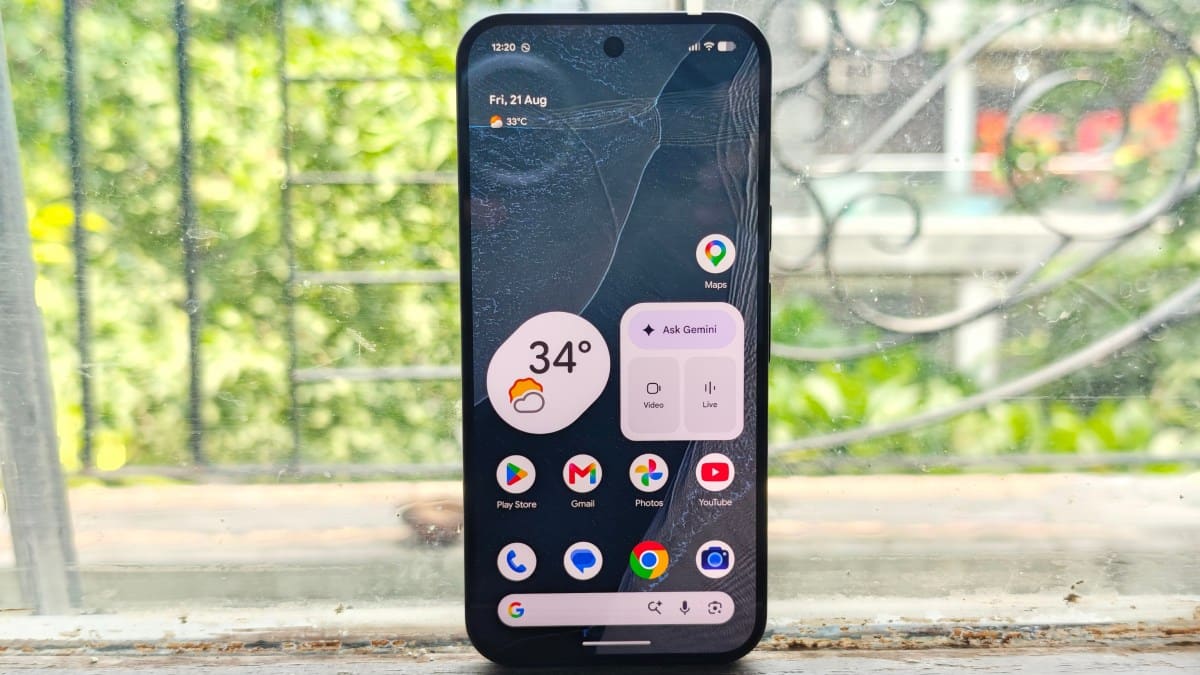
The Pixel 11 Pro XL lands in a peculiar position: it's a competent device that feels more like a mid-cycle software update than a generational leap. After nearly a week with the Obsidian variant, the most obvious changes are cosmetic, new color options and a small LED notification light on the rear panel. The industrial design remains virtually unchanged from its predecessor, meaning casual observers won't notice you're holding Google's latest unless you point it out.
In an era when smartphone upgrades have slowed to incremental improvements, Google faces the challenge every manufacturer confronts: how do you convince users to spend premium money on marginal gains? The answer here is mixed. The Pixel 11 Pro XL excels in specific areas, camera speed, voice dictation, and day-to-day fluidity, but stumbles in justifying its elevated price point, especially after Google cut the base RAM configuration and raised the Pro XL's cost by $100.
Rambler Steals the Show
The standout feature isn't a camera trick or a flashy AI gimmick. It's Rambler, Google's new dictation engine that strips filler words like "um" and "ah" while formatting your speech into readable text. The tool competes directly with third-party apps that have gained traction over the past year, and in practice, it holds its own against the best in the category.
Rambler handles multilingual switching smoothly and performs reliably in noisy environments. For anyone who dictates notes, emails, or messages regularly, this feature alone could become indispensable. It's the kind of utility that fades into the background precisely because it works so well, you stop thinking about it and just use it. While Google may eventually roll Rambler out to older Pixel devices, right now it's an exclusive that actually matters in daily workflows.
The tool's accuracy and speed make it practical for extended use, not just quick voice commands. It's a rare example of an AI feature that solves a real friction point rather than chasing novelty.
Gemini's Proactive Suggestions Miss the Mark
Google continues to lean heavily on Gemini integration, promising context-aware suggestions that anticipate your needs. In testing, the feature surfaced occasionally, such as when friends texted about scheduling, prompting the assistant to offer calendar availability. But the implementation feels half-baked.
Gemini only reads from Google Calendar, ignoring third-party calendar apps. That's a significant limitation for users who juggle multiple platforms. Worse, the assistant failed to suggest obvious information, like a home address, even when that data existed in email history. The inconsistency undermines trust in the feature's reliability.
Agentic capabilities, where Gemini can complete tasks like placing food orders, remain limited to the U.S. market. Testing from India meant those functions stayed out of reach. Live Translate, which overlays real-time captions on video streams, works as advertised but requires downloading language packs in advance, a minor friction point that adds setup overhead.
HiLight: A Solution Searching for a Problem
The HiLight LED on the back of the phone replaces last year's temperature sensor and aims to reduce screen time by delivering notifications through colored light when the device is face-down. The concept is appealing: subtle alerts in green, yellow, pink, purple, or white, depending on the event.
In practice, HiLight's utility is narrow. It activates only for calls from favorite contacts or when Gemini is listening or processing. It doesn't trigger for text messages, app notifications, or most other alerts. The scenarios where HiLight proves useful are limited: your phone is silent, face-down, you're not wearing earbuds, and you happen to be watching the back of the device. That's a small overlap.
The feature has potential if Google opens it up for customization. Imagine assigning different colors to specific apps or contacts, transforming HiLight into a glanceable notification system. Until then, it feels like an undercooked idea shipped before its time.
Camera Hardware Gets a Boost, Speed Improves Noticeably
Google upgraded both the main and telephoto sensors with larger components, allowing more light capture and theoretically more detail. The real-world impact is less about pixel-peeping and more about responsiveness. The camera app launches faster, captures shots with less lag, and processes images more quickly than the Pixel 10 Pro XL.
Night Sight, Google's low-light mode, benefits significantly from these improvements. The exposure time has shortened, reducing the risk of motion blur and making handheld night photography more practical. You no longer need to hold perfectly still for as long, a welcome change when shooting in dim conditions.
Pro Res Zoom, which uses AI upscaling for digital zoom beyond 30x, now extends to 120x from last year's 100x maximum. At extreme zoom levels, keeping the phone steady enough for a usable shot remains difficult, but within the 30x to 50x range, results are surprisingly legible. It's a niche feature, but one that works better than expected.
Looks Reimagines Filters as Computational Styles
Looks represent Google's attempt to move beyond simple filters by altering the computational photography pipeline itself. Four core styles, original, natural, shadows, and vanilla, are set from the main menu, while additional options like editorial, classic, digi, black tie, and minimal can be accessed quickly during shooting.
The differences between Looks are subtle but noticeable. Classic adds grain reminiscent of film; digi mimics the aesthetic of early digital cameras; editorial leans toward higher contrast and saturation. These aren't Instagram filters slapped on after the fact. They adjust how the sensor data is interpreted and processed, which gives photographers more creative control without post-editing.
Google also introduced customizable quick-access controls, allowing users to swap out white balance for ISO or prioritize Looks in the camera interface. It's a small change that makes the camera feel more adaptable to different shooting styles.
Magic Capture: Useful but Limited
Magic Capture records short video clips and uses AI to extract the best moments as still photos. It's particularly effective for unpredictable subjects: pets, children, or sports action where timing is difficult. The feature worked well in testing with cats and a dog, capturing sharp frames from otherwise chaotic movement.
The limitations are notable. Magic Capture struggles with fast-moving subjects, and saved photos are capped at 12 megapixels, lower than the sensor's full resolution. It's a trade-off between convenience and image quality, and for many use cases, the compromise is acceptable. Parents and pet owners will likely find it invaluable; photographers seeking maximum resolution will skip it.
Pricing Undercuts the Value Proposition
Component shortages have forced hardware makers to adjust pricing across the board, and Google is no exception. The Pixel 11 Pro XL costs $100 more than last year's Pro XL, while the base 128GB storage option has been eliminated. Google kept the 256GB models at the same price as last year for the standard Pixel 11 and Pixel 11 Pro, but reduced RAM from 16GB to 12GB in both.
That's a tough sell for existing Pixel 10 users. The camera improvements are real, Rambler is genuinely useful, and the overall experience is polished. But none of these upgrades feel essential enough to justify the cost, especially when Google will likely bring some features to older devices through software updates.
For users coming from a Pixel 9 or earlier, the Pixel 11 Pro XL is a solid upgrade. The camera speed alone makes a noticeable difference in daily shooting. But for anyone holding a Pixel 10 Pro XL, the case for switching is weak. Google has delivered a refined device that doesn't redefine the category, and in a market where phones are lasting longer than ever, that's a problem.
Where Google Goes From Here
The Pixel 11 Pro XL is a reminder that smartphone innovation has entered a phase of diminishing returns. The hardware is excellent, the software is mature, and the ecosystem is robust. Yet the year-over-year delta keeps shrinking, and Google hasn't found a compelling hook to break the cycle.
Rambler stands out as the kind of practical feature that could drive upgrades if marketed correctly. HiLight, by contrast, feels like a feature in search of a purpose. Gemini's proactive capabilities show promise but need deeper integration and broader app support to become truly useful. The camera remains best-in-class, but the improvements are incremental rather than transformative.
For now, the Pixel 11 Pro XL is a phone that's easy to recommend to new buyers and hard to recommend to recent upgraders. That's not a criticism of the device itself, it's a reflection of where the industry stands. Google has built a strong foundation; the challenge is figuring out what comes next when the low-hanging fruit is gone.