Apple's Spyware Alerts Now Push Directly to Lock Screens in 110 Countries
The company has overhauled how it warns users about mercenary spyware attacks, sending notifications that have exposed government surveillance abuses from Warsaw to Washington.
A New Front Door for Security Warnings
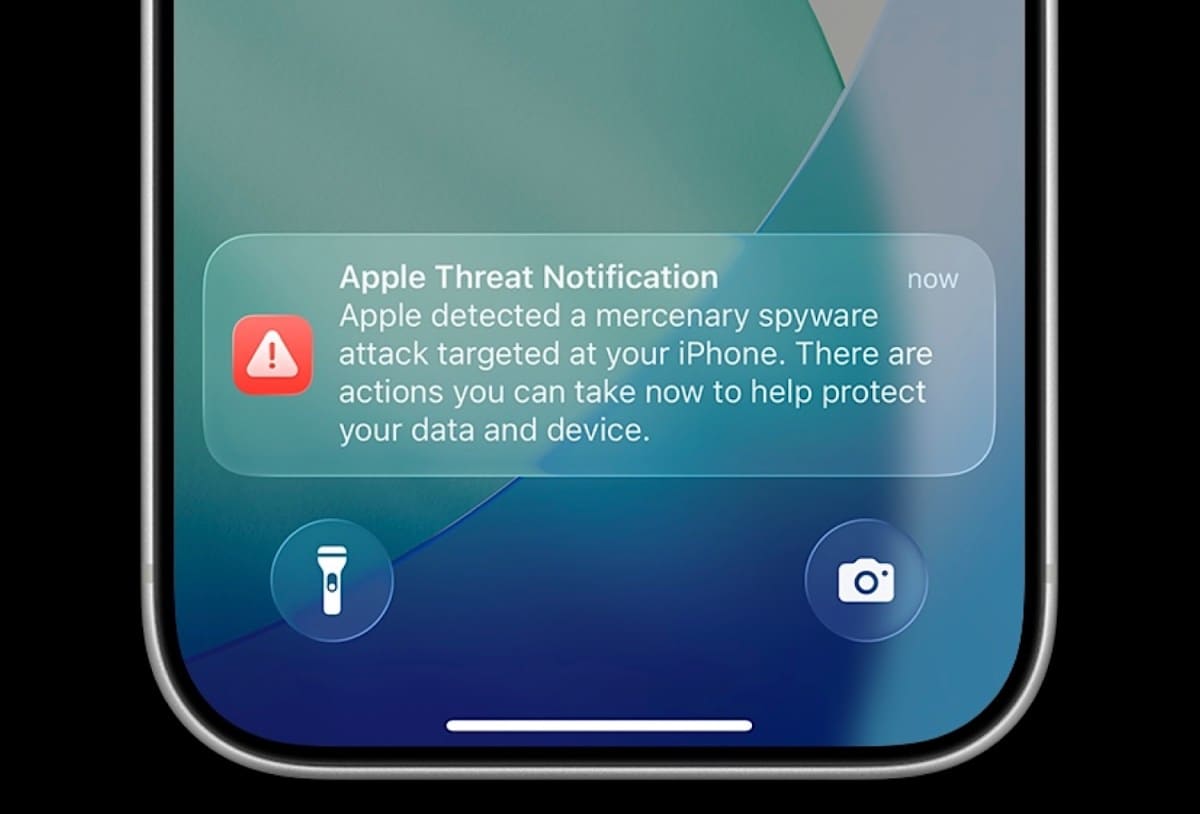
Apple has changed how it tells people their devices might be under attack. Instead of relying solely on email or dashboard alerts that users might miss for days, the company now pushes notifications straight to the iPhone lock screen when it detects signs of mercenary spyware targeting an account. The latest batch went out Thursday to users across 110 countries, part of a notification program that has now reached people in more than 150 nations since it began in 2021.
The shift matters because spyware attacks often succeed in the narrow window between infection and discovery. A lock-screen alert collapses that timeline. The new notification reads: "Apple detected a mercenary spyware attack targeted at your iPhone. There are actions you can take now to protect your data and device." Tapping it brings up step-by-step guidance, including contact information for digital security groups and a prompt to enable Lockdown Mode, Apple's hardened operating mode that strips away attack surface.
At DailyTechWire, we've tracked the global spread of commercial spyware vendors over the past five years. What began as a handful of Israeli and European firms selling to intelligence agencies has metastasized into a multi-billion-dollar industry serving dozens of governments, many with poor human rights records. Apple's expanding notification footprint, now covering more than 150 countries, reflects that proliferation. The company does not disclose which spyware families it detects or which governments it believes are behind specific campaigns, citing operational security.
Why the Lock Screen Matters
The user-experience overhaul addresses a core problem: email and web-dashboard alerts are easy to overlook or dismiss as phishing attempts. A lock-screen notification, by contrast, is immediate and unambiguous. It also arrives on the device that is the target, reinforcing urgency. Apple has updated the support flow so that recipients can access help resources without navigating away from the alert.
John Scott-Railton, a senior researcher at Citizen Lab, the University of Toronto group that has documented spyware abuse in dozens of countries, called the push notifications a "big improvement." He pointed to Poland, where Apple's alerts in late 2021 set off an investigation that eventually revealed the previous government had deployed NSO Group's Pegasus spyware against opposition politicians, lawyers, and journalists during the 2019 election campaign. "That entire massive scandal about spyware abuse in the Polish election wouldn't have been uncovered" without the notifications, Scott-Railton said.
The Polish case illustrates a pattern: notifications create a signal that prompts a subset of targets to seek forensic help, which in turn uncovers broader campaigns. In that sense, Apple's alerts function as an early-warning system not just for individuals but for civil-society networks and investigative teams who can piece together targeting patterns.
What the Alert Does Not Mean
Receiving a notification does not confirm a successful compromise. Apple's detection system flags accounts that show indicators of targeting, which can include reconnaissance activity, failed exploitation attempts, or infrastructure associated with known spyware vendors. The company uses a combination of threat intelligence and on-device behavioral signals to identify anomalies, but false positives are possible, and false negatives are inevitable given the opacity of zero-day exploits and novel tooling.
That ambiguity is by design. Revealing too much about detection methods would help attackers refine their tradecraft. The practical implication for users is straightforward: treat the alert as a credible warning, even if forensic analysis later finds no infection. The recommended steps, starting with enabling Lockdown Mode and consulting a digital security expert, remain sound precautions.
Apple has said it has not yet seen a successful spyware infection on a device running Lockdown Mode. The feature, introduced in iOS 16, disables or restricts dozens of system functions that spyware commonly exploits: message-attachment previews, link previews, web fonts, just-in-time JavaScript compilation, FaceTime calls from unknown contacts, wired connections to accessories, and configuration profiles. The trade-off is usability; some websites break, and media-rich messaging becomes more cumbersome. But for people at elevated risk, the calculus is clear.
The Spyware Economy and Its Targets
Mercenary spyware, the term Apple uses to distinguish government-purchased tools from consumer-grade malware, remains expensive and operationally complex. Vendors like NSO Group, Cytrox, Intellexa, and others charge hundreds of thousands to millions of dollars for access to their platforms, which bundle zero-day exploits, command-and-control infrastructure, and data-exfiltration modules. The high cost and technical sophistication mean attacks are generally targeted rather than opportunistic.
The most common targets are journalists, human-rights defenders, opposition politicians, lawyers, and activists. Citizen Lab's research over the past decade has documented infections in countries including Mexico, Saudi Arabia, the United Arab Emirates, India, Hungary, Thailand, and Spain, among others. In many cases, the spyware was deployed not for counterterrorism or serious-crime investigations but to monitor and intimidate critics of ruling parties or regimes.
The spread to 150-plus countries suggests that either the number of vendor clients has grown, or existing clients are casting wider nets, or both. Export-control regimes, including the Wassenaar Arrangement and unilateral U.S. restrictions on NSO Group and other vendors, have had limited effect. Some vendors have relocated, restructured, or shifted to jurisdictions with looser oversight. Others have spun off subsidiaries or licensed technology to local partners, obscuring supply chains.
What to Do If You Get the Alert
Apple's updated support article walks recipients through immediate actions. First, take a screenshot of the notification and any follow-up messages; these may be useful for later forensic work or legal proceedings. Second, enable Lockdown Mode via Settings, Privacy & Security. Third, update iOS, iPadOS, or macOS to the latest version, which often includes patches for exploits used by spyware. Fourth, review installed apps and configuration profiles, and remove anything unfamiliar. Fifth, change passwords for critical accounts, especially iCloud, and enable two-factor authentication if not already active.
The support page also lists organizations that provide pro-bono assistance to high-risk users, including Citizen Lab, Access Now's Digital Security Helpline, and the Electronic Frontier Foundation. These groups can coordinate forensic analysis, connect targets with legal resources, and document patterns of abuse for advocacy and policy work.
Apple emphasizes that it will never ask for payment, personal information, or remote access in connection with a threat notification. Any message claiming to be from Apple that requests such things is a phishing attempt, likely from the same actors who triggered the original alert.
The Signal, Not the Noise
For security researchers and civil-society groups, Apple's notifications have become a valuable data source. When multiple people in the same community, newsroom, or advocacy organization receive alerts within a short window, it suggests coordinated targeting. That clustering can inform threat models, guide forensic priorities, and support public-interest investigations.
Scott-Railton noted that notifications "create a critical signal that a community is being targeted. People get an alert, and then some of them reach out and seek help. Often this kicks off an investigation that reveals many, many more cases." The Polish example is one of several; similar dynamics have played out in El Salvador, Thailand, and Catalonia, where Apple alerts helped surface previously unknown spyware deployments.
The transparency is partial. Apple does not publish aggregate data on how many notifications it sends each year, which countries receive the most, or which spyware families it detects most frequently. The company argues that such disclosure would aid attackers and compromise future detection. Critics counter that more transparency would help policymakers, researchers, and the public understand the scale of the problem and hold vendors and client governments accountable.
A Cat-and-Mouse Game with No End
The arms race between device makers and spyware vendors shows no sign of slowing. Apple, Google, and other platform providers invest heavily in exploit mitigations, sandboxing, and memory-safety features that raise the cost of zero-day development. Spyware vendors respond by stockpiling exploits, shifting to less-defended attack surfaces like baseband processors or third-party apps, and developing social-engineering tactics that bypass technical defenses.
Lock-screen notifications are one move in that game. They do not prevent infections, but they shorten the dwell time for attackers and increase the likelihood that targets will take protective action. Over time, if enough high-value targets adopt Lockdown Mode and other hardening measures, the return on investment for spyware vendors may decline, forcing them to chase easier prey or exit certain markets.
That outcome is far from guaranteed. Governments have strong incentives to maintain surveillance capabilities, and the spyware industry has proven resilient in the face of export controls, sanctions, and public scandals. What Apple's notifications do achieve is shifting the balance slightly in favor of transparency and defense, giving targets a chance to know they are being watched and to act accordingly.
For users in the 110 countries who received alerts this week, the message is unambiguous: someone with significant resources is interested in what is on your device. The rest is up to you.